SQL Server is a relational database management system from Microsoft.
Discover MoreStructured Query Language (SQL) is the foundation for managing and manipulating data in today’s digital world. It is a language used to communicate with relational databases, enabling users to store, retrieve, update, and manage data efficiently. Whether you're a developer, data analyst, or business professional, understanding SQL is essential for working with data-driven applications and systems.
What is SQL?
SQL is a standardized programming language designed for managing and querying relational databases. It was first developed in the 1970s by IBM researchers and has since become the de facto standard for interacting with databases. SQL is used to perform various operations on data, such as:
Querying data: Retrieving specific information from a database.
Inserting data: Adding new records to a table.
Updating data: Modifying existing records.
Deleting data: Removing records from a table.
Managing database structures: Creating, altering, and deleting tables and other database objects.

Why is SQL Important?
Universal Usage: SQL is supported by almost every relational database management system (RDBMS), including MySQL, PostgreSQL, Oracle, SQL Server, and SQLite. This makes it a versatile skill for working with different database systems.
Data-Driven Decision Making: SQL enables businesses to extract meaningful insights from their data, helping them make informed decisions.
Efficiency: SQL allows users to handle large volumes of data with minimal effort, making it a powerful tool for data analysis and management.
Integration with Other Tools: SQL integrates seamlessly with programming languages like Python, Java, and R, as well as data visualization tools like Tableau and Power BI.
Key Concepts in SQL
1. Relational Databases
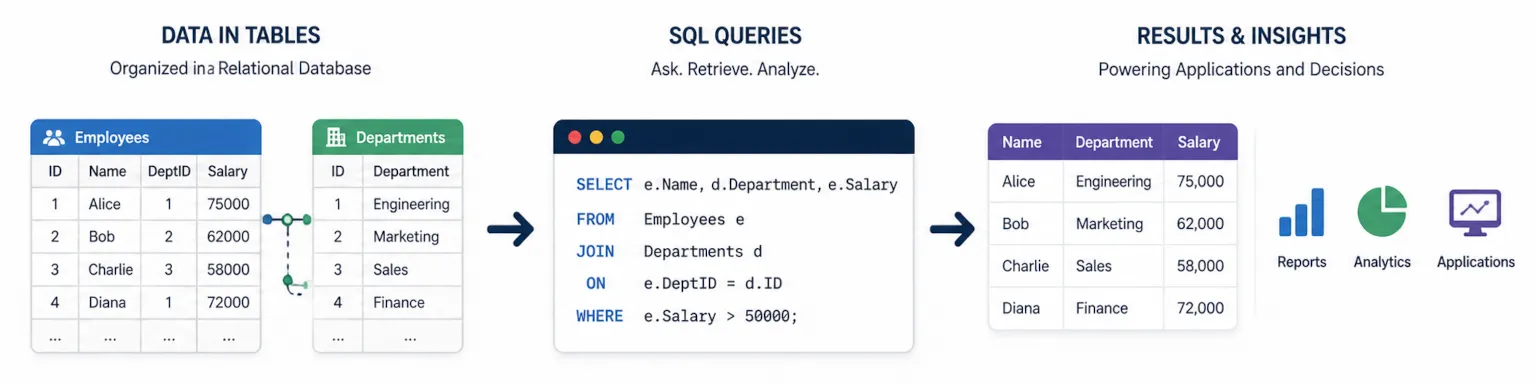
A relational database organizes data into tables, which consist of rows (records) and columns (fields). Tables are related to each other through keys, enabling complex queries across multiple tables.
2. Basic SQL Commands
SELECT: Retrieves data from one or more tables.
SELECT first_name, last_name FROM employees;
INSERT INTO: Adds new records to a table.
INSERT INTO employees (first_name, last_name) VALUES ('John', 'Doe');
UPDATE: Modifies existing records.
UPDATE employees SET salary = 50000 WHERE id = 1;
DELETE: Removes records from a table.
DELETE FROM employees WHERE id = 1;
3. Filtering and Sorting
WHERE: Filters records based on specified conditions.
SELECT * FROM employees WHERE salary > 50000;
ORDER BY: Sorts the result set in ascending or descending order.
SELECT * FROM employees ORDER BY last_name ASC;
4. Joins
Joins combine rows from two or more tables based on a related column.
INNER JOIN: Returns records with matching values in both tables.
SELECT employees.first_name, departments.department_name
FROM employees
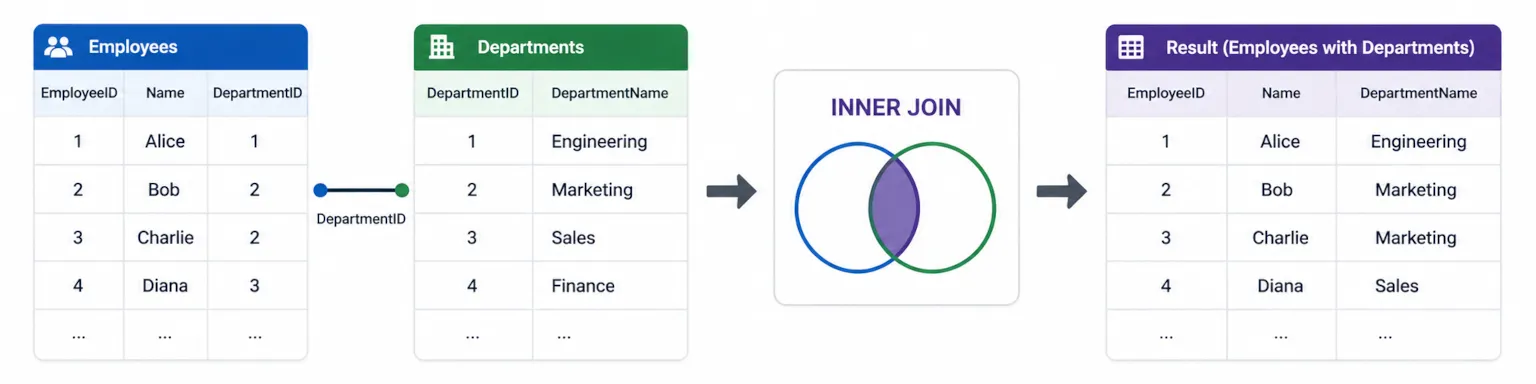
INNER JOIN departments ON employees.department_id = departments.id;
LEFT JOIN: Returns all records from the left table and matching records from the right table.
RIGHT JOIN: Returns all records from the right table and matching records from the left table.
FULL JOIN: Returns all records when there is a match in either table.
5. Aggregate Functions
Aggregate functions perform calculations on a set of values and return a single value.
COUNT: Counts the number of rows.
SELECT COUNT(*) FROM employees;
SUM: Calculates the sum of a numeric column.
SELECT SUM(salary) FROM employees;
AVG: Calculates the average value of a numeric column.
MIN and MAX: Find the minimum and maximum values in a column.
6. Grouping Data
GROUP BY: Groups rows that have the same values into summary rows.
SELECT department_id, AVG(salary) FROM employees GROUP BY department_id;
HAVING: Filters groups based on a condition.
SELECT department_id, AVG(salary) FROM employees GROUP BY department_id HAVING AVG(salary) > 50000;
7. Subqueries
A subquery is a query nested inside another query. It is used to perform operations that require multiple steps.
SELECT first_name FROM employees WHERE salary > (SELECT AVG(salary) FROM employees);
8. Indexes
Indexes improve the speed of data retrieval operations by creating a data structure that allows for faster searches.
CREATE INDEX idx_last_name ON employees (last_name);
9. Transactions
Transactions ensure data integrity by grouping multiple SQL operations into a single unit of work. They follow the ACID properties (Atomicity, Consistency, Isolation, Durability).
BEGIN TRANSACTION;
UPDATE accounts SET balance = balance - 100 WHERE id = 1;
UPDATE accounts SET balance = balance + 100 WHERE id = 2;
COMMIT;
Advanced SQL Concepts
Stored Procedures and Functions: Predefined SQL code that can be reused to perform specific tasks.
Triggers: Automated actions that are executed in response to certain events (e.g., inserting or updating data).
Views: Virtual tables created by querying data from one or more tables.
Window Functions: Perform calculations across a set of table rows related to the current row.
SELECT first_name, salary, RANK() OVER (ORDER BY salary DESC) AS rank FROM employees;
Conclusion
SQL is a powerful and essential tool for anyone working with data. Its simplicity and versatility make it a must-learn skill for developers, data analysts, and database administrators. By mastering SQL, you can unlock the full potential of relational databases and gain the ability to manipulate and analyze data with precision and efficiency.
Whether you're querying a small dataset or managing a large-scale database, SQL provides the tools you need to get the job done. Start practicing today, and you'll soon see why SQL is considered the language of data!
FAQs Related To MySQL Development Company
What is SQL Server and how does it differ from a MySQL Development Company’s offerings?
SQL Server is Microsoft’s relational database management system used for enterprise data storage, analytics, and business applications. A MySQL development company focuses on the MySQL database platform, but many of the architectural principles — like schema design, performance tuning, backup planning, and secure access — overlap with SQL Server when building robust database systems.
Why might a MySQL Development Company work with SQL Server technologies?
Some database specialists and MySQL development companies expand their services to include SQL Server when clients have heterogeneous environments. In this case, they apply their expertise in relational database best practices to SQL Server even if their core expertise is MySQL — particularly around performance, migrations, and Data Management.
What types of solutions are built with SQL Server?
SQL Server is used to build transactional applications, enterprise reporting platforms, business intelligence systems, data warehouses, OLTP systems, and analytics environments. While a MySQL development company might specialize in MySQL for similar use cases, SQL Server is common where Microsoft ecosystem integration and tooling are priorities.
When should a business choose SQL Server over MySQL?
A business might choose SQL Server over MySQL when it needs advanced analytics (e.g., SSAS, SSRS), deep integration with Microsoft technologies, enterprise reporting services, or feature-rich security and compliance controls that are native to the SQL Server platform.
How do SQL Server development services support performance and scalability?
SQL Server development services support performance and scalability through query tuning, index optimization, partitioning, efficient schema design, query plan analysis, and right-sizing hardware or cloud resources. A MySQL development company experienced with query optimization may apply similar strategies when advising on SQL Server workloads.
Can a MySQL Development Company help migrate data to or from SQL Server?
Yes — many database specialists, including MySQL development companies, offer migration services that include moving data between MySQL and SQL Server. This includes schema mapping, Data Flow Architecture, integrity validation, and planning to minimize downtime.
How do SQL Server services support business intelligence?
SQL Server integrates with Microsoft BI tools such as SSRS (reporting), SSIS (integration), and SSAS (analytics). These support enterprise dashboards, ETL pipelines, and multidimensional analysis. A MySQL development company may coordinate cross-platform analytics when SQL Server is part of the data ecosystem, often leveraging Power BI for the final presentation layer.
What security practices are important for SQL Server?
Security in SQL Server includes role-based access control, encryption at rest and in transit, auditing, vulnerability assessments, patch management, and secure authentication mechanisms. A MySQL development company versed in database security principles would apply similar patterns adapted to the SQL Server platform, ensuring compliance standards like those found in our Security (Case Study).
Can SQL Server integrate with modern applications and cloud platforms?
Yes. SQL Server integrates with .NET, Java, Node.js, Python, and REST APIs, and it has first-class support in Microsoft Azure (Azure SQL Database, Managed Instance). This makes SQL Server suitable for modern Cloud Applications, microservices, and analytics platforms.
How do I choose between SQL Server and MySQL for my next project?
Choosing between SQL Server and MySQL depends on factors including licensing, ecosystem fit, analytics needs, existing tools, scale, and compliance requirements. Consulting both SQL Server and MySQL specialists — including a MySQL development company when applicable — can help you evaluate the tradeoffs based on your business goals and Technology Stack.