Build fast, scalable, and user-friendly web applications with React solutions designed around your business goals.
Discover MoreReact Development Services: A Complete Guide for Business Leaders
React is an open-source JavaScript library used to build interactive web and native user interfaces. It allows developers to divide an application into smaller, reusable components and combine those components into complete pages, workflows, and digital products.
Rather than rebuilding an entire page whenever information changes, React updates the relevant parts of the interface. This makes it particularly useful for applications containing dynamic data, user interactions, complex forms, dashboards, notifications, and frequently changing content.

React applications can be implemented as client-side applications, statically generated websites, server-rendered platforms, or a combination of these approaches. Modern React frameworks allow development teams to select a rendering strategy according to the needs of each route, helping balance interactivity, search visibility, performance, and infrastructure requirements.
Organizations evaluating React often benefit from experienced architectural and implementation support. Contact MOST Programming to discuss your application requirements and determine whether React is the right fit for your project.
What This Guide Covers
- What React is and how it works
- The business benefits of React development
- The React development services offered by MOST Programming
- Common React application use cases
- Client-side, server-side, static, and hybrid rendering options
- React performance, security, accessibility, and SEO considerations
- Migration and application-modernization strategies
- The typical React development process
- How to select a React development company
Who This Guide Is For
This guide is intended for business leaders, product owners, technology managers, and development teams considering React for a new application or an existing-system modernization project.
- Replace a legacy user interface
- Build a customer or employee portal
- Develop a scalable SaaS platform
- Create data-intensive dashboards
- Improve application usability and responsiveness
- Standardize reusable UI components
- Support both web and mobile experiences
- Integrate multiple APIs and business systems
What Is React?
React is a JavaScript library for creating user interfaces from independent, reusable components. A component may represent something small, such as a button or form field, or something larger, such as an invoice screen, analytics dashboard, product configurator, or customer profile.
React components are commonly written as JavaScript or TypeScript functions. They receive information through properties, maintain changing information through state, and return the interface that should appear on the screen.
Modern React development primarily uses functional components and Hooks. Hooks allow components to manage state, share application data, synchronize with external systems, and reuse interface logic without relying on class-based components.
Core React Concepts
- Component-Based Development
React applications are constructed from reusable components. Common elements such as navigation menus, data tables, filters, forms, charts, notifications, and modal windows can be developed once and reused across the application. This approach helps teams maintain visual consistency while reducing duplicated code.
- Declarative User Interfaces
Developers describe what the interface should display for the current application state. React then coordinates the corresponding interface updates. This makes complex interactions easier to understand than manually updating individual HTML elements throughout the application.
- State Management
State represents information that can change while a user interacts with an application. Examples include a selected customer, an active tab, form values, search filters, authentication information, or records returned from an API. React provides built-in Hooks for managing local and shared state, while more complex applications can integrate specialized state-management and server-data libraries.
- JSX
JSX is a syntax commonly used in React applications to describe interface elements alongside JavaScript logic. It helps development teams keep a component’s structure, behavior, and data requirements organized in one place.
- One-Way Data Flow
React encourages predictable data movement between components. Parent components can provide information to child components, while user actions can trigger controlled state updates. This structure makes large interfaces easier to test, debug, and maintain.
How React Applications Work
A typical React application connects users, reusable interface components, application state, APIs, authentication services, backend systems, databases, and cloud platforms. Users interact with components in the browser, the application sends or receives data through an integration layer, and React updates the relevant parts of the interface when the data or state changes.
1. Users interact with pages and reusable components.
2. Components manage interface state and user actions.
3. The application communicates with APIs and authentication services.
4. APIs retrieve or update information in backend systems.
5. React updates the relevant components when information changes.
Benefits of Using React for Business Applications
- Reusable Components
Reusable components reduce repeated development effort. Once a reliable table, form control, navigation element, or design-system component has been created, it can be used in multiple areas of the product. This improves consistency and can accelerate the delivery of future features.
- Faster Product Development
React’s component model and established ecosystem allow development teams to assemble applications from tested patterns rather than creating every interface capability from the beginning. Teams can develop independent areas of an application in parallel while sharing common components and standards.
- Scalable Application Architecture
React can support projects ranging from an interactive section of an existing website to a large enterprise platform. A well-structured application can be organized by business feature, route, module, or domain, making it easier to expand as requirements and development teams grow.
- Strong User Experience
React is well suited to applications that require immediate interface feedback, interactive forms, real-time updates, complex filtering, and seamless transitions between views. Loading indicators, optimistic updates, inline validation, and responsive controls can help users complete tasks with fewer interruptions.
- Flexible Technology Integration
React can consume REST APIs, GraphQL services, event streams, and APIs produced by platforms such as Node.js, .NET, Java, Python, and PHP. This allows organizations to modernize the frontend without necessarily replacing their existing backend systems.
- Large Development Ecosystem
React supports a broad ecosystem of tools for routing, testing, data fetching, state management, component libraries, visualization, forms, accessibility, and application monitoring. Supporting tools should be selected according to project requirements rather than popularity alone.
React Development Services
- Custom React Application Development
MOST Programming develops React applications around specific operational workflows and business objectives. Custom development may include SaaS applications, customer self-service portals, employee and partner portals, administrative platforms, business process applications, product configuration tools, scheduling systems, and reporting applications.
- Enterprise React Development
Enterprise applications frequently require complex permissions, large datasets, integrations, audit capabilities, and support for multiple business units. Our approach focuses on modular architecture, maintainable code, reusable design systems, testing, security, performance, and controlled deployment practices.
- React Dashboard Development
React is a strong option for dashboards that combine data from multiple systems and present it through tables, charts, indicators, maps, filters, and interactive reports. MOST Programming can integrate React interfaces with analytics services, operational databases, cloud platforms, and business-intelligence systems.
- React Portal Development
We build secure portals for customers, employees, vendors, partners, and other authorized users. Portal functionality can include account management, document access, invoice and payment information, service requests, notifications, messaging, scheduling, reporting, and role-based permissions.
- React UI and UX Development
A technically functional application may still perform poorly when its workflows are confusing or inconsistent. Our UI and UX services focus on responsive layouts, clear navigation, accessible controls, consistent interaction patterns, and interfaces designed around actual user tasks.
- React API Integration
We connect React applications with REST and GraphQL APIs, authentication providers, payment services, cloud platforms, content-management systems, reporting systems, mapping services, communication platforms, and enterprise applications.
- React Migration and Modernization
React can be introduced incrementally into an existing website or application. Individual screens, workflows, or modules can be modernized while the remaining system continues to operate. Migration may include legacy JavaScript to React, class components to functions, JavaScript to TypeScript, outdated React versions to a supported version, Create React App migration, and monolithic interfaces to modular architectures.
- React Maintenance and Support
React applications require ongoing dependency management, security updates, performance monitoring, browser compatibility testing, and feature enhancement. MOST Programming can provide continuing support after launch to keep the application reliable, secure, and aligned with changing business requirements.
Common Applications Built with React
- SaaS Platforms
React supports subscription-based products containing account management, configurable workflows, dashboards, notifications, billing, and role-based functionality.
- Data and Analytics Applications
Interactive filters, data tables, visualizations, drill-down reports, and live metrics can be combined into a responsive analytical experience.
- Customer and Employee Portals
React can provide a consistent interface for account information, service history, documents, communications, payments, and internal processes.
- E-Commerce and Product Configuration
React can support searchable catalogs, configurable products, pricing workflows, checkout experiences, inventory information, and customer-specific options.
- Real-Time Applications
Operational dashboards, messaging systems, collaboration tools, scheduling platforms, and monitoring interfaces can display updates without forcing users to reload the page.
- Application Modernization
Legacy applications can be modernized module by module, helping organizations improve usability without immediately replacing every backend service and operational process.
- Cross-Platform Products
Organizations can share selected development knowledge and business logic between React web applications and React Native mobile applications while designing each interface for its target platform.
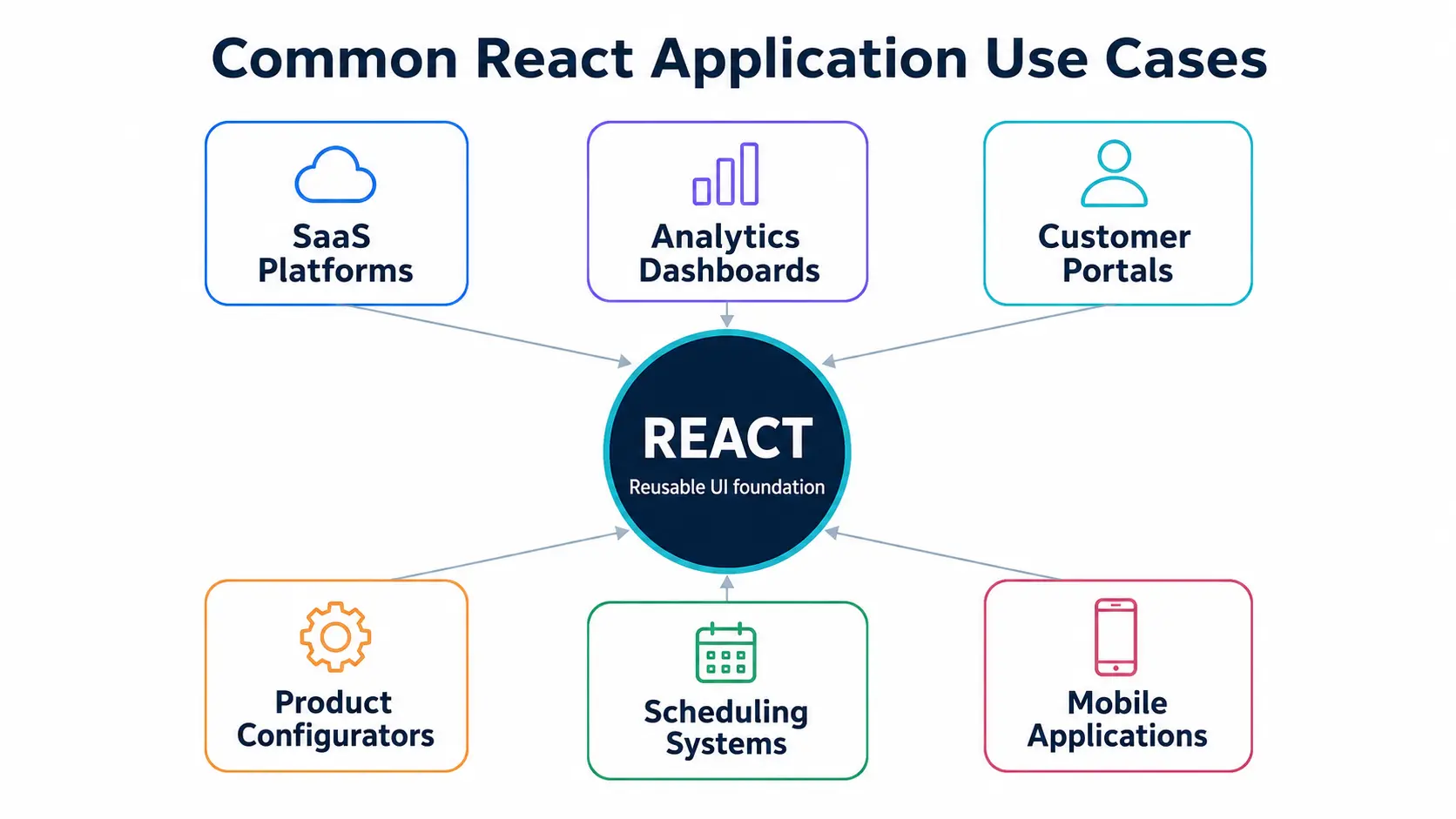
Figure 2. Common React application use cases.
React Rendering Strategies
Selecting the correct rendering strategy is an important architectural decision. Modern React applications do not need to use the same approach for every screen.
| Rendering strategy | Best suited for | Primary benefit |
|---|---|---|
| Client-Side Rendering | Authenticated portals and highly interactive applications | Rich interaction after the application loads |
| Static-Site Generation | Marketing pages, documentation, and content that changes less frequently | Fast delivery through static hosting and CDNs |
| Server-Side Rendering | Public, personalized, or frequently changing pages | Initial HTML is generated for each request |
| React Server Components | Applications that need to reduce client-side JavaScript and perform selected work outside the browser | Moves selected rendering and data operations away from the client |
| Hybrid Rendering | Applications containing both public content and interactive private areas | Uses an appropriate strategy for each route |
React Frameworks and Supporting Technologies
React provides the interface foundation, while production applications normally require additional capabilities such as routing, data loading, authentication, caching, error handling, and deployment configuration.
The React team recommends a React-powered framework for many new production applications because frameworks coordinate these related concerns and support multiple rendering approaches. Create React App has been deprecated for new applications, with teams encouraged to use an appropriate framework or a modern build tool.
| Technology | Typical role |
|---|---|
| Next.js or React Router | Application routing and rendering architecture |
| Vite | Fast development and build tooling for client-focused applications |
| TypeScript | Static typing and improved development tooling |
| TanStack Query or framework data APIs | Server-data fetching and caching |
| Redux, Zustand, or Context | Shared client-side state where required |
| React Hook Form and schema validation | Structured form development |
| Vitest or Jest | Unit and integration testing |
| Playwright or Cypress | End-to-end workflow testing |
| Storybook | Isolated component development and documentation |
React Performance and SEO
React does not automatically guarantee a fast application. Performance depends on architecture, rendering strategy, bundle size, data-loading patterns, component design, caching, assets, and deployment configuration.
Performance Practices
- Route-level code splitting
- Lazy loading of noncritical features
- Server-side or static rendering for suitable pages
- Optimized API requests and caching
- Removal of unnecessary component renders
- Efficient handling of large data tables and lists
- Image and asset optimization
- Browser and CDN caching
- Performance monitoring and Core Web Vitals reviews
- Reduction of unnecessary JavaScript
React Compiler is a stable build-time optimization tool that can automatically optimize eligible components and Hooks through memoization, reducing the need for some manual performance optimizations.
SEO Practices for Public React Pages
- Deliver meaningful HTML through static or server rendering
- Create unique page titles and meta descriptions
- Implement canonical URLs
- Generate structured data
- Produce crawlable internal links
- Manage sitemaps and robots directives
- Prevent duplicate content
- Optimize page speed and layout stability
- Support social-sharing metadata
- Ensure important content remains available when JavaScript execution is delayed
React Accessibility
Accessibility should be included throughout the design and development process. A React application should use semantic HTML, descriptive form labels, keyboard-friendly navigation, visible focus states, suitable color contrast, accessible error messages, and appropriate screen-reader information.
Reusable components are particularly valuable for accessibility because improvements to a shared component can benefit every screen where it is used. Accessibility testing should combine automated tools with manual keyboard and assistive-technology reviews.
React Application Security
React escapes text values by default, but application security still depends on the broader architecture and development practices.
- Strong authentication and authorization
- Secure token and session handling
- Server-side permission enforcement
- Validation of user input
- Careful handling of externally supplied HTML
- Protection against cross-site scripting
- Content Security Policy where appropriate
- Secure API communication
- Dependency and vulnerability monitoring
- Protection of sensitive configuration data
- Audit logging for critical workflows
- Regular framework and dependency updates
Important security principle
Authorization decisions must not rely only on hiding buttons or routes in the frontend. Backend services must independently verify every protected action.
Our React Development Process
1. Discovery and Requirements Analysis
We begin by understanding the users, workflows, business goals, integrations, technical constraints, and expected outcomes.
2. Architecture and Technology Selection
The team selects the rendering strategy, framework, state-management approach, integration pattern, testing tools, and deployment architecture.
3. User Experience and Component Planning
Wireframes, workflows, responsive behavior, and reusable components are defined before large-scale implementation begins.
4. Iterative Development
Features are implemented in manageable increments, allowing stakeholders to review working software and provide feedback throughout development.
5. Integration
The React application is connected to APIs, backend services, identity providers, databases, cloud platforms, and third-party systems.
6. Testing and Quality Assurance
Testing may include component tests, integration tests, API tests, accessibility reviews, performance tests, browser testing, and end-to-end workflow automation.
7. Deployment and Release
The application is deployed using an appropriate cloud, server, container, CDN, or static-hosting architecture.
8. Monitoring and Continuous Improvement
After launch, application behavior, usage, errors, and performance can be monitored to identify defects, usability issues, and future enhancement opportunities.

Figure 3. React development lifecycle.
Common React Development Challenges and Solutions
| Challenge | Typical impact | Recommended response |
|---|---|---|
| Complex State Management | State is duplicated across components, making updates unpredictable. | Keep state close to where it is used, establish a clear ownership model, separate server data from client state, and introduce shared state management only when the application genuinely requires it. |
| Unnecessary Re-Renders | Large screens become slow because components repeatedly perform expensive work. | Profile the application, improve component boundaries, stabilize data structures, virtualize large lists, and optimize only the areas shown to have a measurable problem. |
| Poor SEO in Client-Only Applications | Important public content depends entirely on browser-side JavaScript. | Use static generation or server rendering for public routes and define page metadata as part of the application architecture. |
| Inconsistent Components | Different development teams create slightly different versions of the same control. | Establish a shared design system and documented component library with ownership, accessibility standards, and testing. |
| Dependency and Upgrade Problems | The application relies on outdated or unnecessary packages. | Minimize dependencies, evaluate packages before adoption, automate vulnerability checks, and schedule controlled framework upgrades. |
Why Choose MOST Programming as Your React Development Company?
MOST Programming combines frontend development experience with data integration, analytics, cloud, API, and custom software capabilities. This allows our team to consider the complete application rather than treating the React interface as an isolated layer.
- Understanding business workflows before selecting technology
- Designing reusable and maintainable components
- Integrating complex data and backend systems
- Supporting responsive and accessible user experiences
- Building testable application architecture
- Planning performance and SEO from the beginning
- Maintaining clear communication throughout delivery
- Providing ongoing enhancement and technical support
Whether you are developing a new digital product, modernizing a legacy application, or improving an existing React platform, our goal is to create software that supports measurable business outcomes.
Ready to Build or Modernize Your React Application?
Work with MOST Programming to create a responsive, scalable, and maintainable React application aligned with your business workflows.
Conclusion and Next Steps
React provides a flexible foundation for developing interactive, responsive, and scalable applications. Its component-based architecture supports faster product development, consistent interfaces, and gradual application modernization. When combined with the correct framework, rendering strategy, API architecture, testing approach, and deployment platform, React can support both customer-facing websites and complex enterprise systems.
1. Define the users, workflows, and measurable business outcomes.
2. Identify integration, security, performance, and SEO requirements.
3. Select an architecture based on the application’s actual needs.
4. Begin with a focused release that can be tested with real users.
5. Expand the application through measurable, iterative improvements.
Contact MOST Programming to discuss your React development, migration, integration, or application-modernization requirements.
Related Technologies and Services
- JavaScript Development Services
- TypeScript Development Services
- Node.js Development Services
- Cloud Application Development
- Data Management and Optimization
- Interactive Analytical Cloud Applications
- AI and Machine Learning Solutions
- MOST Programming Technology Stack
Frequently Asked Questions About React Development Services
What are React development services?
React development services include planning, designing, developing, testing, deploying, and maintaining applications built with React. Services may include custom application development, portals, dashboards, API integration, migration, performance optimization, and ongoing support.
Is React a library or a framework?
React is officially described as a library for building web and native user interfaces. Production applications often combine React with a framework that provides routing, data loading, rendering, caching, and deployment capabilities.
What types of applications can a React development company build?
A React development company can build SaaS platforms, customer portals, administrative systems, dashboards, e-commerce experiences, product configurators, scheduling applications, and other interactive web products.
Is React suitable for enterprise applications?
Yes. React can support enterprise applications when it is combined with clear architecture, consistent component standards, testing, security controls, performance monitoring, and an appropriate backend integration strategy.
Is React SEO-friendly?
React can support strong SEO, but the rendering strategy matters. Public pages normally benefit from static generation or server rendering so meaningful HTML, metadata, and internal links are available when the page is delivered.
Can React be added to an existing application?
Yes. React can be introduced into selected sections of an existing application. This enables organizations to modernize high-value screens gradually instead of committing immediately to a complete rewrite.
Should React applications use TypeScript?
TypeScript is generally valuable for medium and large React applications. It can improve development tooling, clarify component contracts, and identify certain errors before the application runs.
How much does React application development cost?
The cost depends on the number and complexity of workflows, integrations, design requirements, user roles, data volume, security requirements, testing coverage, and deployment architecture. A focused discovery phase is normally required before providing a reliable estimate.
How long does it take to build a React application?
A focused prototype may be completed relatively quickly, while a complex enterprise platform can require several phases. The timeline depends on project scope, integration readiness, stakeholder availability, and the number of features included in the initial release.
What is the difference between hiring a React developer and a React development company?
An individual developer may be suitable for a small, well-defined project with internal technical leadership. A development company is generally more appropriate when the project requires product discovery, UX design, architecture, multiple developers, quality assurance, deployment, and long-term support.
Can React be used for mobile application development?
React Native is used to develop native mobile applications using related React concepts. Organizations may be able to share selected skills, patterns, and business logic between web and mobile teams.
How are React applications tested?
React applications can be tested through component tests, integration tests, end-to-end workflow tests, API tests, accessibility reviews, browser compatibility testing, and performance testing.
How does a React development company improve application security?
A professional development team applies secure authentication, backend authorization, input validation, controlled dependency management, secure API communication, code review, vulnerability scanning, and ongoing framework updates.
Does MOST Programming provide React maintenance and support?
Yes. React support can include defect resolution, dependency updates, security improvements, performance optimization, feature development, integration changes, and application monitoring.
How can an organization get started with React development services?
Begin by documenting the main users, workflows, business outcomes, integrations, and existing technical constraints. MOST Programming can then evaluate the requirements and recommend an appropriate React architecture, implementation plan, and delivery approach.